
- Keep Your Account Accessible and Flexible
- What are the benefits?
- How many email addresses can I add?
- Adding an Email Address
- Choosing Your Primary Email Address
- What happens when I change my Primary Email Address?
- Removing an Email Address
- When can't I remove an email address?
- Replacing an Existing Email Address
Keep Your Account Accessible and Flexible
We've introduced a new way to manage your account by allowing you to link multiple email addresses to a single Springer Nature account.
Whether you're changing jobs, using different email addresses for work and personal activities, or simply want more flexibility when signing in, you can now manage all your email addresses in one place.
What are the benefits?
By adding multiple email addresses to your account, you can:
- Sign in using more than one email address.
- Keep access to your account if you change employer or email provider.
- Manage work and personal email addresses from a single account.
- Choose which email address receives Springer Nature communications.
- Reduce the need to create multiple accounts.
How many email addresses can I add?
You can normally add up to five email addresses to a single account.
In some situations, such as after account merges or when using linked sign-in services like Google or ORCID, your account may contain more than five associated email addresses.
Adding an Email Address
To add a new email address:
- Sign in to your account.
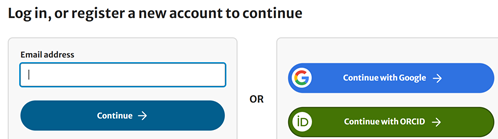
- Go to Manage Account.
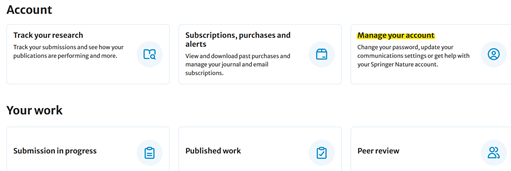
- Open the Email Addresses section.
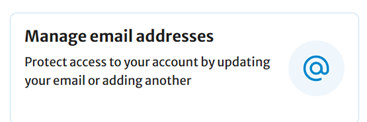
- Select Add Email Address.

- Enter the email address you would like to add.
- After the email is added. the status for the new email will show “verify”
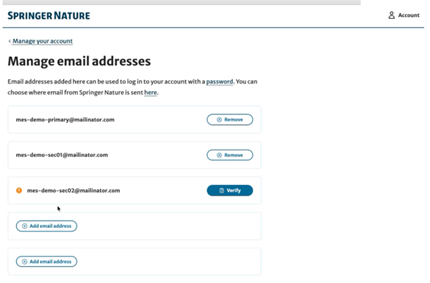
- Check your inbox for a verification email.
- Follow the instructions in the email to verify ownership of the address.
Once verified, the new email address will be available for sign in and account management.
Important
- Every email address must be verified before it can be used.
- Verification links are valid for 48 hours.
- Email addresses that are already linked to another Springer Nature account cannot be added.
Choosing Your Primary Email Address
One email address on your account will always be designated as your Primary Email Address.
This email address is used for:
- Account communications
- Service updates
- Notifications
- Password and account-related messages
You can change your Primary Email Address at any time by selecting another verified email address on your account.
What happens when I change my Primary Email Address?
Changing your Primary Email Address only changes where we send communications.
Your account remains the same and your existing sign-in methods continue to work, including:
- Password sign-in
- Institutional sign-in
- Google sign-in
- ORCID sign-in
Removing an Email Address
If you no longer need an email address on your account, you can remove it.
To remove an email address:
- Go to Manage Account.
- Open Email Addresses.
- Select Remove next to the email address.
- Confirm your choice.
Once removed, you will no longer be able to sign in using that email address.
When can't I remove an email address?
The Remove option may not be available if:
- It is the only email address on your account.
- The email address is linked to Google sign-in.
- The email address is linked to an active ORCID connection.
- The email address has not yet been verified.
If an email address is currently receiving Springer Nature communications, you'll be asked to choose another communication email address before it can be removed.
Replacing an Existing Email Address
If you have multiple email addresses and want to replace one of them, simply:
- Add the new email address.
- Verify the new email address.
- Remove the old email address.
This ensures you maintain uninterrupted access to your account.
Frequently Asked Questions
Do I need to verify every email address?
Yes. Every email address added to your account must be verified before it can be fully used.
Can I sign in using any verified email address on my account?
Yes. Once an email address has been verified and added to your account, it can be used to access your account.
Can I add an email address that already has a Springer Nature account?
No. An email address that is already associated with another account cannot be added as an additional email address. In this scenario the accounts would need to be merged
Will changing my Primary Email Address affect how I sign in?
No. Your existing sign-in methods remain linked to your account.
What should I do if my verification link has expired?
If more than 48 hours have passed, you'll need to start the process again and request a new verification email.
If you have any questions then please email customerservice@Springernature.com